BLOG

SEO for photographers: 7 ChatGPT prompts for blogging

SEO (Search Engine Optimization) is often seen as complex and intimidating, but with a bit of guidance, it can be one of your best marketing tools — and more manageable than it seems. An important aspect of a strong SEO for your photography website is blogging. In this article, we’ll cover tips for creating an SEO-friendly photography blog and share 7 ChatGPT prompts to help you write blog content that is useful for your readers and discoverable online.
What is SEO (Search Engine Optimization)
SEO is the process of helping search engines (like Google) and AI search tools find and understand your website. When your site is optimized for SEO, Google can discover it, crawl through its pages, and show it in search results when people look for something related to what you offer. In other words, SEO helps Google know your site exists and makes sure the right people can find it.
If your website is on Pixieset, it’s already created with SEO in mind. All the site templates are automatically optimized and easy for search engines to navigate, giving you a strong starting point for improving your search rankings. Learn more about getting started with SEO on your Pixieset Website.
Why blogging is important for SEO
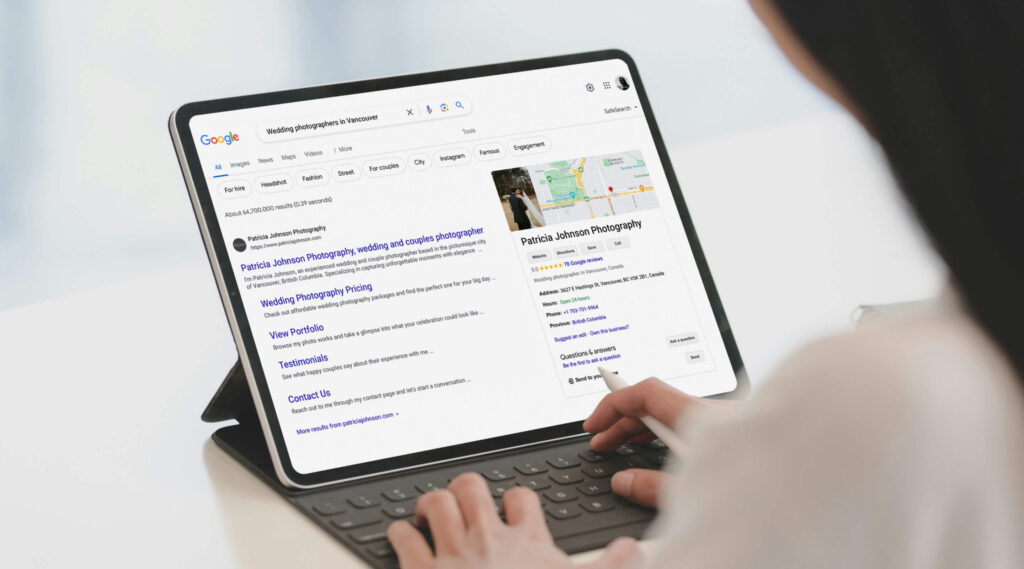
According to recent SEO stats, 89% of marketers prioritize blog content in their SEO strategy. Running a blog gives you more control over the topics your site is associated with in search results. And because search engines “prefer” fresh, up-to-date content, your blog is an opportunity to stay relevant.
But blogging is not just about SEO. When you share genuinely useful information, your readers benefit from it, and that’s what really matters. Writing helpful posts such as “how to prepare for holiday mini sessions” or “best family photo spots in [your town]” shows the audience that you’re not only an expert in your field, but also someone who likes to share their behind-the-scenes tips without trying to sell something.
When you share quality content your audience cares about, they’re more likely to trust you and reach out for a session. At the same time, great posts encourage people to spend more time on your site, which can be a sign for search engines that your content is valuable. This can help improve your ranking and bring even more traffic to your blog or website.
Want to learn more? Here’s everything you need to know about blogging as a photographer.

10 SEO blogging tips for photographers
Before you dive into your blog strategy and start writing, here are a few tips that can help your articles (and by extension, your website) naturally rank high in search results.
- Write for people first, for Google second. A blog that checks all the SEO boxes but doesn’t offer value to readers won’t perform well in the long run. Start by understanding your audience, what they’re interested in, and what they search for online — and create content that’s truly useful for them. If you focus on that, you automatically make it easier for search engines to scan your content and show it to the people who need it.
- Use keywords. These are the words and phrases people type into Google or AI search tools when they’re searching for something, such as “photography mini sessions.” Using these in your blog title, headings, and paragraphs helps people find your articles. But it’s important to not overdo it. Google doesn’t just scan exact words; it looks at meaning and context around them. For example, searches like “mini sessions near me,” “how much do mini photo sessions cost,” or “best photographer for mini sessions in [your location]” all have the same intent, even though the words are different. The goal is to create content that sounds human while still matching what your clients are looking for.
- Use headings and catchy titles. Break your content into sections with clear headings, especially in longer posts. Headings make it easy for readers to scan your article and help Google understand your content. Your blog title should be catchy but not overpromising or clickbait. Titles that perform best often include numbers (”10 tips for preparing for a mini session”) or “how-to” phrasing (”How to dress for a family photoshoot”). You can also include your keyword if it fits naturally, but don’t force it at the expense of a clear, straightforward title.

- Balance text and photos. As a photographer, it’s tempting to want to let your images do all the talking, but adding some text to the post helps people (and Google) understand the story behind them. If you’re sharing a recent love story you’ve captured, write about the couple, the location, what made the session special, and include no more than 20–30 images. We also recommend having some text-centric posts, with fewer photos and more written content. For example, client resources or session tips, to give your audience more value and variety.
- Optimize your images. The size of your images impacts how quickly your blog post loads, and faster load times improve your SEO ranking. If you’re using Pixieset for blogging, we automatically create and use appropriate display sizes of your images to help speed up your site. You can also pull images directly from your Pixieset galleries, so you don’t have to upload them twice. Alternatively, you can optimize your images before uploading, with tools like TinyPNG or JPEGmini. Keep in mind file formats, too. PNGs are usually heavier than JPEGs, so use PNGs on your website only when you need a transparent background, like for logos or icons.
- Add alt text for images. Search engines can’t “see” your images, but images are a big part of how people experience your website. Alt text describes your images and helps Google understand what they’re about. Make sure to add alt text to all images on your blog and other site pages. If you’re using Pixieset Website, with the help of AI, you can generate descriptive alt text for each photo on your site, or toggle the option to automatically add alt text to all current and future photos you upload. To get started, go to your SEO settings and start generating alt text for your images.
- Add page descriptions. Page descriptions are important for SEO and often serve as a visitor’s first impression, since they appear as the snippet in Google search results. Be sure to add a description for your entire blog and for each individual post. If you’re using Pixieset, you can generate them with AI by going to the page settings and clicking “Generate” in the page description window. Learn more about creating SEO content with AI for your Pixieset website.
- Use SEO-friendly URL slugs. Some website platforms generate random URL slugs, which you may need to edit. SEO-friendly slugs make your URLs easier for search engines to read and more understandable for your visitors. They should be short, clear, and descriptive versions of your post title, for example, www.yourwebsitename.com/blog/mini-session-tips. When changing your website template or platform, it’s important to keep the same URL slugs for your pages and blog posts, so you don’t lose search rankings. But if you’re using Pixieset, you can import all your blog posts from your live site to a new template or set redirects if needed, keeping both your content and URL slugs intact.
- Include internal and external links in blog posts. Link to your own relevant posts (internal links) to keep readers exploring your site and to help Google understand your site’s structure. Or add external links to trusted sources or well-known brands, to show search engines that your content is credible and well-researched. Plus, mentioning other brands or vendors might open doors for collaborations, cross-promotions, or shares that bring new leads your way.
- Keep your blog mobile-friendly. Most website traffic comes from phones rather than desktops, and Google ranks mobile-friendly sites higher in mobile search results. This is something many photographers often overlook — they make sure their homepage looks good on large computer screens, but often overlook checking their site and blog on mobile, which is just as important. If you’re on Pixieset, you don’t need to worry about that! Your site is automatically optimized for smaller screens, and you can further personalize your pages for mobile viewing.
Discover more SEO tips for photographers.
How to write effective prompts for ChatGPT
AI can be incredibly powerful for brainstorming, outlining the structure, and polishing your blog posts, but only if you know how to guide it. The secret is in the prompt: the clearer and more precise you are, the better results you get. Here are some tips for writing effective prompts for ChatGPT:
- Be specific. Make your request specific and give as many details as you can. A prompt like “Write an SEO-friendly blog outline for a Tuscany destination wedding love story, focusing on documentary-style storytelling” will be far more effective than “Write a post about a wedding” or “Improve this paragraph”.
- Give context about your audience. Tell ChatGPT who you’re writing for. Are they couples, families, or brand clients? A good prompt describing the audience would be: “Write a blog introduction for couples planning an outdoor elopement in Colorado who value hikes and nature.”
- Mention your voice and style of writing. Specify your tone of writing. Is it down-to-earth, warm, and conversational, like a photographer sharing their real experiences? Or more professional and editorial?
- Use role prompts. ChatGPT likes it when you assign it a role, as it helps it “think” like the right kind of writer. For example: “Act as an SEO copywriter for wedding photographers.” or “Write like a real wedding photographer sharing their expertise”.
- Ask open-ended questions. These are great for brainstorming ideas or research, not necessarily for improving your writing directly. Phrase your prompts as open-ended questions that start with how, what, or why rather than yes/no questions. For example, “What are some engaging blog post ideas for a photographer who works with families?” will work much better than “Can you give me blog ideas?”.
- Follow up and iterate. With ChatGPT, you won’t always get the best response on the first try. Start with a prompt, review the result, and ask ChatGPT to refine it until it feels right. Try follow-up requests like “make this sound more conversational” or “add a paragraph about why this location is great for photos.” It’s like a creative back-and-forth rather than a one-time command.
- Break the process into steps. You’ll get better results when you ask for one part at a time. For example, outline first, then introduction, then keywords.

7 ChatGPT prompts for writing photography blog posts
We strongly encourage you use AI as a tool and assistant, not as a replacement of your voice or your work. Ask it to help improve or tighten your writing, and refine the structure or organize ideas, not directly write the text for you. Always double-check facts, personalize the writing with your genuine input, and make sure it still sounds like you. Here are some AI prompt ideas (developed and refined with the help of ChatGPT) you can use to improve your photography blog for SEO. You can adapt them by swapping in your niche, location, and other details.
#1 Brainstorm blog topic ideas
If you want to plan your blog content a few months in advance, this step is a great place to start. Here is the prompt:
Act as a marketing strategist for photographers. First, give me 10 blog post ideas for a [type of] photographer based in [location]. Focus on topics that attract [target audience — ie., couples planning outdoor elopements], and suggest ideas that help them prepare for their photo sessions. For each idea, include a short description or list of points I could cover. Then, act as a [type of] photographer who writes helpful blogs for [type of clients], and give me 5 blog post ideas I could write about my recent [session type] at [venue/location]. Optionally, ask me relevant questions about the session to help tailor your response.
Example: “Act as a marketing strategist for wedding photographers. Give me 10 blog post ideas for a wedding photographer in Italy specializing in documentary-style storytelling and destination weddings. Focus on topics that attract couples planning destination weddings or elopements in Italy, and suggest ideas that help them prepare for their photo sessions. For each idea, include a short description or list of points I could cover. Then, act as a wedding photographer who writes helpful blogs for engaged couples, and give me 5 blog post ideas I could write about my recent wedding at Villa Balbiano on Lake Como. Optionally, ask me relevant questions about the session to help tailor your response.”
#2 Create the blog post outline
Once you have a few topics, the next step is to plan the flow for each post, so it’s easier to write later. Here is the prompt:
Act as an SEO writer for photographers. Outline a blog post about [topic] with sections that cover [blog content]. Additionally, act as a [type of] photographer writing a blog about [session type] at [venue/location]. Outline the post with 4–6 sections that guide readers through the day naturally. Make sure the outline balances SEO-friendly structure with a natural tone that reflects a photographer’s voice.
Example: "Act as an SEO writer for photographers. Outline a blog post about how to plan your destination wedding in Italy with sections that cover choosing a location, understanding local customs, finding vendors, the best time of year, and travel tips for guests. Additionally, act as a wedding photographer writing a blog about a destination wedding at Villa Balbiano on Lake Como. Outline the post with 4–6 sections that guide readers through the day naturally. Make sure the outline balances SEO-friendly structure with a natural tone that reflects a photographer’s voice.”
#3 Generate keywords and relevant phrases
Once you’ve chosen your topic, you can ask ChatGPT to find keywords and phrases that make your blog easier to discover online, without sounding forced or “too SEO.” Here is the prompt:
Act as an SEO writer and marketing strategist for [type of] photographers. Suggest a list of 15 natural keywords and phrases I can use for a blog post about [topic]. Group them into ‘main keywords’ (the big ideas) and ‘supporting phrases’ (descriptive or location-based words).
Example: “Act as an SEO writer and marketing strategist for wedding photographers. Suggest a list of 15 natural keywords and phrases I can use for a blog post about planning an elopement in Tuscany. Group them into 'main keywords' (the big ideas) and 'supporting phrases' (descriptive or location-based words).”
Follow-up prompts:
Rank these keywords by relevance and search potential for my [target audience].Highlight 3–5 primary keywords I should focus on for this post.Show me where to naturally include each keyword, in the title, headings, or body paragraphs.Write 2–3 sample sentences using these keywords in a way that sounds authentic.

#4 Generate headlines and titles
Your title and the headlines are the first thing people see when they skim through the article. They need to grab attention and make it clear what the post is about. Here is a prompt for crafting titles and headlines that naturally include your keywords from #3.
Act as a copywriter and brand strategist for [type of] photographers. Write 10 blog title ideas for a post about [topic/session], naturally including the keywords from this list: [paste keywords]. Include a mix of clear, keyword-friendly options and more creative, emotional ones. The titles should appeal to [target audience].
Example: “Act as a copywriter and brand strategist for wedding photographers. Write 10 blog title ideas for a post about Sophie and Daniel’s romantic elopement in Tuscany, naturally including the keywords: “Tuscany elopement photographer,” “eloping in Italy,” and “intimate wedding in Tuscany.” Include a mix of clear, keyword-friendly options and more creative, emotional ones. The titles should appeal to couples dreaming of a romantic destination wedding in Italy and reflect a warm, natural photographer’s voice.”
#5 Proofread and refine the tone
Once you’ve drafted your post, have ChatGPT review, polish it, and improve grammar and flow. You can also adjust the tone of your writing to make it sound closer to your brand. Here is the prompt:
Act as a professional copy editor, writing coach, and photography blog editor for [type of] photographers. Proofread this blog post and fix grammar, punctuation, and flow. Suggest improvements for clarity, sentence rhythm, and readability while preserving my natural voice and tone. Provide specific, constructive feedback where helpful, and keep all edits consistent with a photographer’s storytelling style: [paste text].
Example: “Act as a professional copy editor, writing coach, and photography blog editor for wedding photographers. Proofread this blog post and fix grammar, punctuation, and flow. Suggest improvements for clarity, sentence rhythm, and readability while preserving my natural voice and tone. Provide specific, constructive feedback where helpful, and keep all edits consistent with a photographer’s storytelling style. Here’s the blog post: [paste text]”
Pro tip: Do multiple rounds. First focus on grammar, then on making the tone more personal. You can also ask ChatGPT to give you three tone variations of a paragraph, so you can choose the best fit.
#6 Optimize for SEO
Optimizing your blog means making it easy to read and more discoverable online by using keywords strategically and structuring your post to make it scannable. Here is the prompt:
Act as an SEO strategist and copywriter for [type of] photographers. Optimize this blog post for both readability and search visibility: [paste text]. Use my main keywords naturally throughout the post: [paste keywords]. Suggest headings and subheadings that include these keywords organically, and break long paragraphs into shorter, scannable sections while keeping my personal tone and storytelling style intact. Recommend where supporting keywords could be added within the body to improve SEO flow. Finally, write a meta description between 150–160 characters that summarizes the post clearly and includes one main keyword. Keep the overall structure reader-friendly, true to my voice, and aligned with what real clients might search for.
Example: “Act as an SEO strategist and copywriter for wedding photographers. Optimize this blog post for both readability and search visibility: [paste blog post here — for example, “Isabella & Marco’s Elegant Lake Como Wedding”]. Use my main keywords naturally throughout the post: “Lake Como wedding photographer,” “destination wedding in Italy,” and “romantic Lake Como wedding.” Suggest headings and subheadings that include these keywords organically, and break long paragraphs into shorter, scannable sections while keeping my personal tone and storytelling style intact. Recommend where supporting keywords such as “villa wedding in Lake Como,” “Italy elopement,” or “intimate wedding celebration” could be added within the body to improve SEO flow. Finally, write a meta description between 150–160 characters that summarizes the post clearly and includes one main keyword. Keep the overall structure reader-friendly, true to my voice, and aligned with what real clients might search for.”
#7 Repurpose the content for other channels
AI can be great at helping you repurpose the blog post into Instagram captions, Pinterest posts, newsletters, or other formats to reach your community without writing from scratch. Here is the prompt:
Act as a marketing strategist for [type of] photographers. Transform this blog post: [paste blog text] into content for multiple channels. Create 3 Instagram captions highlighting key moments and storytelling, with slightly different variations and relevant hashtags. Rewrite it into 3 Pinterest-friendly descriptions that summarize the content, include keywords naturally, and provide 2–3 variations. Finally, summarize the post into a short, engaging newsletter inviting readers to view the gallery or book a session, with 2–3 alternative versions. Keep all outputs personable, warm, and consistent with my voice. Suggest a moderate amount of emojis.
Example: “Act as a marketing strategist for wedding photographers. Transform this blog post: [paste blog text] into content for multiple channels. Create 3 Instagram captions highlighting key moments and storytelling, with slightly different variations and relevant hashtags. Rewrite it into 3 Pinterest-friendly descriptions that summarize the content, include keywords naturally, and provide 2–3 variations. Finally, summarize the post into a short, engaging newsletter inviting readers to view the gallery or book a session, with 2–3 alternative versions. Keep all outputs personable, warm, and consistent with my brand voice. Suggest a moderate amount of emojis.“
Start a photography blog with Pixieset Website
Add a beautiful photography blog to your Pixieset Website and start sharing your stories, sessions, and creative insights. With blogging built right into your website, you can create, publish, and update posts without ever leaving your Pixieset dashboard. Import your favorite images from your galleries, automatically migrate blog posts when switching to a new website template, and keep your site fresh with new content. Learn more about blogging with Pixieset Website here.
New to Pixieset Website? Start with a free account, pick a ready-made template, and create an elegant, professional site for your photography business.
Get started with Pixieset for free and create a beautiful photography website

 Store
Store 
 Studio Manager