BLOG

5 ways to make invoicing easier for photographers

Invoicing is more than a way to get paid. It’s an opportunity to create a smooth, stress-free experience for both you and your clients. With the right workflows, invoicing can feel effortless, help you stay organized, and take the pressure out of money conversations. From flexible payment methods to mobile-friendly options, here are five ways to make invoicing easier and more enjoyable, with the help of tools, such as Pixieset’s Studio Manager.
1. Offer preferred payment methods
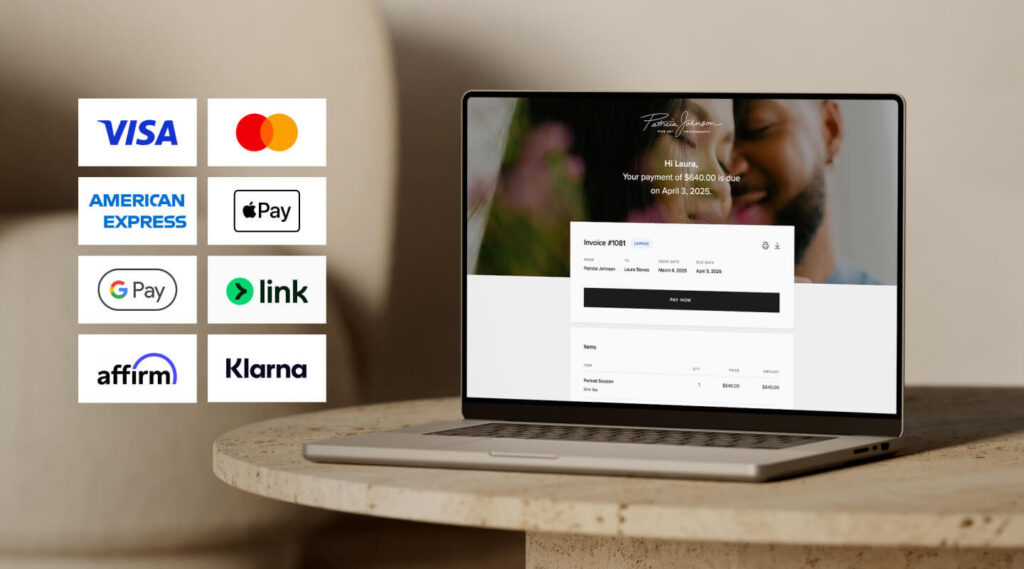
Offering multiple payment methods gives clients the flexibility to pay in the way that works best for them, which can help you get paid faster and create a smoother experience overall. With Pixieset’s Studio Manager, you can accept:
• Credit/debit cards. A widely-used option that’s convenient for most clients and allows for immediate payment.
• Digital wallets. Great for mobile users who prefer quick, contactless checkout using their smartphones. Apple Pay, Google Pay, and Link.
• Tap-to-Pay (available for Canada and US users): A Studio Manager mobile app feature that lets photographers accept contactless payments directly on their phone — no card reader required.
• ACH bank transfers (available for US users). Ideal for high-value bookings, as they come with lower fees and are secure for both parties.
• Buy-now-pay-later options like Klarna and Affirm. Perfect for clients who want to spread out payments over time, making it easier to book higher-tier packages.
With Pixieset’s Studio Manager you can create digital invoices and offer all of the above payment methods, powered by Pixieset Payments. Learn how to get started here.

2. Include a payment schedule
Offering payment schedules makes it easier for clients to budget for larger sessions, like weddings or multi-shoot projects. Breaking the cost into smaller installments feels more manageable and makes hiring you feel more accessible. For photographers, it also means a steadier income over time instead of waiting for one big payment. Here are two helpful tips when offering installment payments:
- Set clear payment dates (fixed or milestone-based). Decide whether you want to use fixed calendar dates, for example the 1st of each month, or custom dates tied to project milestones: after confirming booking, photoshoot day, or after delivery of photos. This helps set expectations early and aligns your client with your photography workflow.
- Keep the number of installments manageable. Aim for 2–4 installments, depending on the total value and timeline of the project. Too many payments can feel confusing or overwhelming for clients, while too few might not offer enough flexibility. Strike a balance that’s simple and effective, while supporting your work process.
In Studio Manager, you can set up payment schedules that work for your clients and give you full control over how and when you get paid. Adding payment plans is easy. Just select the number of installments and due dates for each, and we’ll automatically send the client reminders when it’s time for them to pay. You stay professional, skip the back and forths or awkward money talk, and keep the cash flow moving.

3. Automate reminders and confirmations
With automated reminders, your clients get a friendly heads-up a few days before each payment is due, helping them stay on track. Once a payment is made, an automatic confirmation reassures them that everything is processed smoothly. These small touches make a big difference in how professional and seamless your service feels. Best of all, it saves you from having to send follow-up emails, while keeping your cash flow moving on time.
With Pixieset Studio Manager, you can set up automated payment reminders and confirmations for every invoice—so you stay organized and get paid without the stress. Learn more.

4. Send digital invoices
Skip the PDFs and simplify your billing process with digital invoices that are easy to send, track, and get paid through. Unlike manual or paper-based invoicing, digital tools let you create polished, professional invoices in minutes—and deliver them straight to your clients via email or a secure link.
Today’s clients expect to be able to handle everything from their phone, and invoicing is no exception. That’s why it’s essential to use mobile-friendly invoices with a clean, responsive design. Whether they’re at home or on the go, clients can quickly review their invoice and submit payment from any device—no downloading or printing. It’s a smoother experience for them, and a more reliable way for you to stay on top of payments.
With Pixieset Studio Manager, you can create beautifully branded invoices that can be paid from any device, send them with a click, and even track when they’ve been viewed or paid.

5. Offer contactless payments
Make it easy for clients to pay you on the spot — no cash, card readers, or extra devices needed. Contactless payment options like tap-to-pay offer a smooth, secure way for clients to pay in person using their credit card, debit card, or mobile wallet. It’s perfect for full sessions, mini sessions, pop-up events, or any time you want to finalize payment on the spot.
Accepting payments instantly not only helps you avoid late follow-ups, but also creates a more seamless, professional experience for your clients. Plus, it shows that you’re flexible and up to date with the way people prefer to pay today.
With the Studio Manager mobile app, you can create and send digital invoices on the go, and turn on Tap to Pay to accept payments directly from your phone, turning your mobile device into a secure, contactless payment terminal. To use Tap to Pay, you’ll need to activate Pixieset Payments, available in the US and Canada.
More useful online documents for photographers: quotes, contracts and questionnaires
Running a photography business involves managing various documents, not just invoices. Instead of relying on PDFs and email attachments, consider using a platform that lets you create and share digital contracts, questionnaires, and quotes. Even better if you can manage everything within a single tool, reducing the need to juggle multiple apps.
Important features to consider for your digital documents:
- Electronic signatures. Make it easy for clients to sign contracts securely and legally without printing, scanning, or mailing. Built-in eSignatures speed up the booking process and help you secure your business.
- Option to fill out information online. For questionnaires or forms, ensure clients can complete and submit their responses directly online from any device. This not only saves time but also ensures you receive all the important details in an organized way, making it easy to review and store.
- Include contracts and questionnaires in the booking flow. Look for a system that allows you to attach contracts, questionnaires, or other intake documents right to your booking process—so everything your client needs to review, sign, and submit is in one place. This creates a seamless onboarding experience and reduces back-and-forth communication.
- Personalization options. Opt for a tool that lets you add your logo and tweak fonts and colors, so all your documents feel on-brand. Branded documents look more polished and professional, helping you make a strong impression from the very first interaction.
- Ability to create and save templates. Saving and reusing document templates can significantly reduce admin work. Whether it’s a standard contract or a recurring questionnaire, having templates ready to go ensures consistency and saves time. Learn how templates can help you improve your photography workflow.
Pixieset Studio Manager lets you send and manage all of these documents in one place: online, beautifully branded, and easy for clients to access from any device. You can attach contracts and questionnaires directly to the booking flow, so clients can sign, fill out forms, and accept quotes all at once. And with the Studio Manager mobile app, you can do it all from your phone—while on the move.

Simplify invoicing for you and your clients with Pixieset
Making invoicing easier is all about removing friction — for both sides. When clients have flexible ways to pay and easy access to the details they need, they’re more likely to pay on time and feel confident in the experience you’re providing. And when everything is organized and connected on your end, you spend less time chasing payments and more time photographing.
With Pixieset Studio Manager, you can streamline your entire process. From sending quotes and contracts to collecting payments, everything looks consistent and is managed from one convenient place. And with the Studio Manager mobile app, you can run your entire photography business on the go.
Get started with a free account to simplify your invoicing workflow

 Studio Manager