BLOG

The all-new Studio Manager mobile app is available now! Manage your business on the go

Photographers are always on the move — from photo sessions to client meetings and location scouting, with little time for admin work, emails, and everything in between. But what if your business tools moved with you, keeping you in control no matter where you are? With the Studio Manager mobile app, you can review bookings, send invoices, and stay connected with clients — all from your phone. Download the app today and run your business from anywhere!
Here’s what you can do with the Studio Manager mobile app:
- Book clients from anywhere: Schedule new photo sessions, review upcoming bookings, and manage your calendar on the go.
- Get paid faster: Create and send invoices directly from the app, and collect payments quickly.
- Stay connected with clients: Check emails, respond to inquiries, and chat with clients, even while traveling.
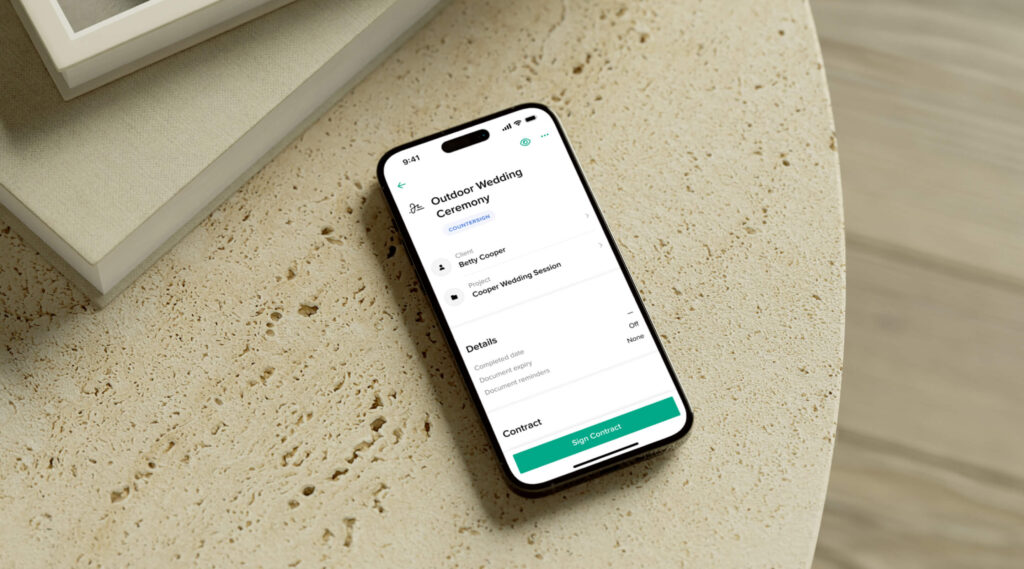
- Send contracts, questionnaires, and more: With the app in your pocket, creating, editing, and sharing documents with clients is a breeze.
- Track projects: Get a quick overview of all your client work, check progress, and update details right on your phone.
- Get instant notifications and reminders: Stay informed about new bookings, payments, signed contracts, and everything else happening in your business.
- Accept in-person payments with Tap to Pay: After a session, let your client pay on the spot using a credit card, Apple Pay, or another digital wallet. All they need to do is tap your phone, and the payment is processed instantly. Available in the US and Canada.
Go to the App Store or Google Play to download the app!
Book clients from anywhere
Sometimes, opportunities strike when you’re away from your desk. Whether you're chatting with a potential client in person or receiving an inquiry via email, the Studio Manager mobile app lets you take action instantly. Create a new session on the spot, send an invite, and let the client confirm right away. A fast response keeps the momentum going and increases your chances of securing the booking before they move on to another photographer.
With the Studio Manager mobile app, you can track bookings, check your calendar for upcoming sessions, review client preferences, and more — no matter where you are.
Get paid faster
If a client asks about your pricing or is ready to book, send them an invoice instantly through the Studio Manager mobile app to lock it in. They can view the invoice on their phone and immediately pay by credit card or digital wallet. If a client pays in cash, simply log it in the app to keep your records accurate. It’s simple, easy, and helps you keep a pulse on things.
Also, accept in-person payments right on your phone with Tap to Pay. After wrapping up a photoshoot, simply open the Studio Manager mobile app and initiate the payment process. Clients can pay with their credit or debit card, Apple Pay or Google Pay — just by tapping your phone. Learn how to set up Tap to Pay.
Stay connected with clients
With the Studio Manager mobile app in your pocket, staying connected and building new client relationships has never been easier. Met someone interested in your services? Open the app, add them as a contact, and send a quick hello email to keep the conversation going.
The app also helps you stay on top of client communication with instant notifications and quick access to your inbox. Whether you're answering questions about a contract, handling a last-minute session request, or responding to a client who just received their gallery — you can do that directly from the app. To save even more time, create email templates for common scenarios, so you can send thoughtful responses in just a few taps.
Send contracts, questionnaires, and more
Keep everything organized and up to date, even when you're on the go. If you need to adjust a contract or invoice, simply open the mobile app, make changes, and send it off to the client. Before sessions, check the client’s questionnaire to refresh your memory on their preferences, special requests, or their kids’ names.
With the Studio Manager mobile app, you never miss an important update — from signed contracts to completed questionnaires and accepted price quotes.
Track client work with projects
The Projects Board in Studio Manager keeps all your client work organized while you’re on the move. After each session, open the mobile app to update the client’s project card — adjust its status, attach new documents, or add important notes and takeaways.
Get instant notifications and reminders
Stay informed no matter where you are. The Studio Manager mobile app delivers notifications for every new booking, payment, and email, keeping you in the loop with everything happening in your business. Respond to inquiries and client requests quickly, even when you're not at your computer.

Download the Studio Manager mobile app today
The beauty of the Pixieset Studio Manager, is that it allows photographers to run their business in a more efficient and organized way, from their computer and phone. Take care of bookings, payments, contracts, and everything else, no matter where you are. Available to all Pixieset users for free, you can download the Studio Manager mobile app from the App Store and Google Play.
Looking for the Client Gallery app?
The Client Gallery mobile app is in the works! Meanwhile, log into your Pixieset account on your phone to upload, edit, and share galleries effortlessly. The Client Gallery dashboard is mobile-optimized so you can manage collections and deliver your work on the go.
 Website
 Client Gallery
 Store
Store 
 Studio Manager