BLOG
What is Pixieset, how does it work and who is it for

If you’re a photographer looking for the best tools that can help you deliver photo galleries, build a website, invoice clients and get paid, send contracts, book sessions online, and even cull and edit photos — you’re in the right place.
In this article we’ll tell you about Pixieset, what it is, who is it for, how it works, and why over a million photographers use it to run their business in a more streamlined and professional way.
The best part? You can get started with Pixieset via a free plan and use all of the tools described below. Just create a free account, it only takes a minute and it doesn’t require a credit card.

What is Pixieset?
Pixieset is an all-in-one platform for photographers that helps you run your photography business end to end — from photo editing and delivery to selling photos and prints, building a website, booking clients, sending contracts, invoices, questionnaires, tracking projects, and receiving payments. It’s the ONLY tool you’ll ever need to run your photography business effortlessly and in a professional way. The beauty of Pixieset, is that it’s so intuitive, everyone can use it. From beginner photographers to seasoned experts who want a simple solution that saves them time, and keeps everything organized in one place.
If you’re new to Pixieset, or haven’t had the chance to try all the features available inside the dashboard (though you should, because each of these products is available via a FREE plan, here’s what’s included:
Client Gallery
Client Gallery is a simple, intuitive and elegant tool that helps you deliver photos (JPEGs, GIFs, PNGs, RAWs) and high-resolution videos to clients. Your customers can preview their images and videos, favorite photos, download them and order prints directly through the gallery. Check out some real gallery examples from photographers who use Pixieset. Client Gallery also supports volume photography workflows, and email marketing campaigns.
Store
Store integrates directly with your galleries and allows clients to purchase print products and digital photos straight from their gallery. Clients can select the products, create a custom photo album, or greeting cards with their photos, then place an order to have them printed. They can also pay and download photos as digital files. Store orders are fulfilled automatically if you choose one of Pixieset's partner labs, or you can handle prints manually through your own preferred lab.
Website
Pixieset Website makes designing a website a breeze. Start with a beautiful pre-made template, add your text and images (you can also import them from your photo galleries), customize the layout — and you're done. No coding skills required. Your website is hosted on Pixieset, and you can launch it in just a few hours. Check out all the website templates available on Pixieset.
Studio Manager
Studio Manager is a business management tool designed to help photographers book clients online for full sessions and minis, send invoices and get paid, do contracts, questionnaires, email clients, and organize their work into projects. Photographers can also run their business on the go with the Studio Manager mobile app.
Photo Editor
Photo Editor is a complete edit-to-delivery workflow built right into Pixieset. From culling to editing to final delivery, you stay in full creative control of your photos and edits, while AI helps you move faster, cut back on repetitive tasks, and deliver your signature look consistently. Photo Editor supports RAW editing, allows you to create preset styles from your past galleries, and export the final photos directly into a Pixieset gallery.
Mobile Gallery App
With Mobile Gallery App you can create custom photo apps that your clients can install on their mobile phone to quickly preview their gallery. Each app is personalized to a specific client and includes their photos, your branding, your contact details and social media links.
Now that you're familiar with Pixieset's products, let’s explore the main reasons why you’ll love using Pixieset for your photography business.

Why use Pixieset for your photography business?
Here are 4 reasons why you need to try Pixieset for your photography business:
#1. Simplicity and ease of use, for both you and your clients
The entire Pixieset dashboard is designed in a very simple and intuitive way. Even if it’s your first time logging into the platform, you’ll find your way around features and settings in no time. It was important for us to transfer this user-friendly experience to your photography clients too — so receiving photos, ordering prints, paying for an invoice or signing a contract is seamless and pleasant.
“I would highly recommend Pixieset for photo delivery to all photographers. I have tried many other popular delivery methods which some are great, but its not Pixieset great. I have never received a question from clients on how they can use their gallery. It is all set up so simply and easy to understand. There is a walkthrough on the client’s end on how to use the platform which again, saves everyone time. Also, if you are a fan of prints, you will love Pixieset’s options. Great quality, fast turn around and a seamless workflow. Now go sign up or you’ll miss out ya nerds!” — Alex Richardson, Love Tribe Weddings.
#2. Consistent brand experience across all touch points with your client
Don’t you just love it when everything is on brand, and looks elegant all across? From your website and photo galleries, to your print store, your contracts and invoices? A consistent look helps build trust and familiarity towards your brand, as well as ensures a lovely experience for your clients. It also makes you look professional, regardless whether this is your first client gig, or you’ve been photographing for years.
“It is nice for clients to have the same look and feel when I send them invoices as they do when they receive their galleries or even look at my website." — Danieka Erasmus, Picturist Photography.
#3. All your tools are in one place
Time is a limited resource, and we all crave for more quality time spent with our loved ones, outdoors, photographing. Pixieset is designed to help you streamline your daily workflow, have all your tools and documents in one place, easily accessible - so you spend less time on admin work, and more time on the things you love.
“Using Pixieset has been amazing for my business. I’ve been using Pixieset for 4 years now. I started with the client galleries. When they launched their website templates, I switched over immediately. It feels very organised and streamlined to have everything in one place. I love how user-friendly the website is, and how I can make changes so easily. Clients have often commented on how easy it is to navigate and to find the information they need quickly and clearly.” — Chloe May.
#4. Affordability (including free plans)
If you’re only starting out your photography journey — great news! Each Pixieset product is available via a free plan. All you have to do is sign up (no credit card required) and use the products you like, for free. Upgrade when you’re ready.
If you’re a seasoned photographer, who needs an extensive solution that allows you to build an online presence, book clients, collect payments, sign contracts, deliver photo galleries — then there’s no better deal available out there than the Suite plan on Pixieset. For $38/month you get access to all the features inside the platform and can fully power up your photography brand.
"I’ve been using Pixieset for about eight years for delivering client galleries, but it wasn’t until I made the leap and transitioned my entire business to Pixieset that I realized just how amazing their business platform for photographers really is. Using Pixieset for my photography business literally handles it all—from my website to galleries, contracts, invoicing, scheduling, and even print sales. Everything is in one place, everything is tracked and organized, and I can spend more time working ON my business and less time IN it." — Ryan Breitkreutz

Who is Pixieset for?
Pixieset is for photographers who want an elegant, easy and professional way to deliver photos (JPEGs, RAWs, GIFs, PNGs) and videos, build a website, book clients, collect payments, send documents, cull and edit photos, and more. Whether you’re only getting started as a photographer, or have been in the industry for years — Pixieset can help you manage your business in a simple, organized, and effortless way.
Join over a million photographers from all around the world, who use Pixieset to run and grow their business. Sign up for free via pixieset.com and discover all the tools you need.
How does Pixieset work?
All Pixieset products are available via a free plan. Create an account (no credit card required) to start exploring each tool and its features. Inside your dashboard you’ll find Client Gallery, Store, Website, Studio Manager, Photo Editor, and Mobile Gallery App.
Here are the main features and functionality available inside each product:

Pixieset Client Gallery
- Unlimited amount of galleries - create as many photo collections as you want. Your storage limit depends on your plan. The free plan starts at 3GB of storage and our top plan gives you unlimited storage.
- Support for multiple media formats - deliver JPEGs, RAWs, GIFs, PNGs and high-resolution videos to your clients. You can also add photos, GIFs and embed videos into the gallery covers for a strong first impression.
- Gallery personalization options - add your branding, connect your custom domain, customize the cover, font, colors and collection layout.
- Collection presets - speed up your workflow by pre-saving your preferred collection settings as a preset. From styling and privacy options, to downloads, print store or watermark settings. Create multiple presets for the different types of photography galleries your deliver, then apply them with one click to any new or existing gallery.
- Photo proofing - your clients can create Favorites lists inside their gallery and leave comments under photos with special requests. With a single click, copy the filenames of the photos your client chose and paste them into Pixieset Photo Editor, or your tool of choice, to quickly retouch and reupload those photos back into the gallery.
- Privacy settings - password-protected galleries and exclusive client access that limits image visibility for guests. Clients can also mark specific photos in their gallery as private.
- Download control - turn on or off the download option for photos or videos inside a gallery. Limit the amount of photos a client can download for free from the gallery, with the possibility to purchase extra images.
- Mobile optimized dashboard - log into Pixieset from your phone to edit or share galleries with clients. You can also upload photos and videos directly from your camera roll, while on the go.
- Email Campaigns - run print sales, promote services, request reviews, and share updates, all directly through Pixieset. With opt-in options built right into your galleries, clients can subscribe to your mailing list as they view their photos, create favorite lists, or order prints.
- Folders - organize and share multiple galleries with clients through a single link —especially useful for event and volume photographers.
- Volume photography workflows — Before a shoot, upload a CSV file with your clients' details, gallery names, and email addresses, and Pixieset will automatically create the galleries and assign the correct client to each one. If your photos are ready to be delivered, you can simply upload the folders from your computer into Client Gallery, and we'll create individual galleries for each folder automatically. From there, delivering your work is easy. Select the galleries you want to share, make sure each gallery has a contact attached, and click Send. Each client will receive a personalized email containing their own gallery link, password, and download PIN. Learn more.
- Share photos with clients and vendors - you have multiple ways to share your work through Pixieset. You can share a gallery via email, by sending a direct link or by having clients scan a QR code. You can also share only a curated selection of images from a gallery through a Quick Share Link, while keeping the rest of the gallery private. This is perfect when you want to send photos to a vendor, or share inspiration with a potential client.
- Gift cards- offer clients and their loved ones gift cards with a certain $ amount, so they can use it when purchasing digital images and prints in their gallery. To use this feature, you need to have Store turned on for your gallery.
- Coupons - offer discounts to clients as a dollar amount, percentage off, free shipping, or even a free product from your store when they purchase for a certain sum or a certain product. This feature is available for galleries that have Store turned on.
- Watermarks - the built-in watermark tool will help you protect the images within your photo collections. The watermark is only applied on the photo previews. Once your client pays, you send them a download PIN that they can use to download the high-resolution images without the watermark (it's removed automatically).
- Multi-language options - you can have your photo galleries displayed in English, Spanish, French, German, Dutch, Chinese (simplified), Portuguese or Swedish.
- Dashboard in your language - the Client Gallery dashboard automatically shows in English, Spanish, or Portuguese based on your location. Our team is working to bring more language options to our users.
- Email address registration - anyone who wants to view a photo gallery will be prompted to enter their email address. All the addresses are stored inside your Pixieset dashboard, where you can view and export them.
- Gallery assist - turn this option on to guide clients through their photo gallery and explain each of the features available inside their gallery, i.e. how to download photos, favorite photos, purchase photos, etc.
- Mobile Gallery App - create customized photo apps that your clients can download to their mobile phone to quickly preview their photos.
- SEO options - you're in control of whether your client galleries show up in search results or not.
- Google Analytics integration - keep track of the traffic that accesses your client galleries, find out where viewers come from, what device they use to view your collections, etc.
- Gallery invite emails - your clients receive an elegant invite to preview their gallery even when you’re not at the computer. If you work with clients from different timezones, or prefer to share collections on specific dates and at certain times - schedule your collection sharing emails. To save time, you can also create email templates and use them when messaging clients in the future.

Pixieset Studio Manager
- Booking & Scheduling - present all your photography services via an elegant Booking site, where clients can check out details, pick a date and book a session based on your availability. You can require them to sign a contract, fill out a questionnaire and pay a full or partial session fee during booking. You can also include extra services as add-ons, so your clients can customize their session with additional options they want. Lastly, you can integrate your Zoom or Google Meet accounts to book video calls, or simply use the booking site to book phone calls.
- Intake forms - add intake forms such as a contract and questionnaire into your booking flow, so clients are required to sign the contract, and fill out the questionnaire, in order to reserve their session.
- Booking Coupons - offer discounts on sessions to attract new clients. The coupon code can be applied at checkout, during booking.
- Calendar - sync Google Calendar with Pixieset to view your entire schedule in one place, personal appointments and client sessions. To avoid double-booking, Studio Manager will automatically block your personal appointments off your booking calendar.
- Invoices - create and send invoices to clients, offer payment schedules (also used for deposits), add a discount or tax, and allow clients to pay online, in-person with Tap to Pay, or offline by manually marking your invoices as paid for bookkeeping.
- Payment Links - standalone, branded payment page that you can share with clients to get paid for a service, product, or anything else. Payment Links don’t need to be created for each transaction. You simply create a link once and reuse it, allowing clients to pay through it anytime, from any device. Payment Links are also a great way to collect tips post a session.
- Pixieset Payments - Pixieset's built-in payment system that allows photographers to collect payments, receive payouts, request funding, process disputes and refunds, and track everything related to their finances right inside their Pixieset dashboard. Your clients get the flexibility to pay by credit cards, Apple Pay, Google Pay, Link, Affirm, Klarna, Tap to Pay, and more.
- Other payment methods available in Pixieset - apart from Pixieset Payments, photographers can also connect their Stripe or PayPal accounts, or record offline payments (cash, checks, etc) for bookkeeping.
- Collect tips - add optional tips directly to your invoices, create a payment link clients can use to leave a tip after their session, or collect tips in person through Tap to Pay in the Studio Manager mobile app.
- Reports - track all payments that come through invoices and payment links, as well as cash or checks that you collect manually. Manage refunds, disputes, and payouts.
- Contracts with eSignature - create and send professional photography contracts to clients, that they can sign online, from any device. Add a second signer, use smart fields to let clients fill out their information, and add expiry dates, and schedule when your contract should be sent out.
- Questionnaires - create questionnaires to collect important client information prior to a session. Then gather feedback and testimonials after delivering your services, also through a questionnaire.
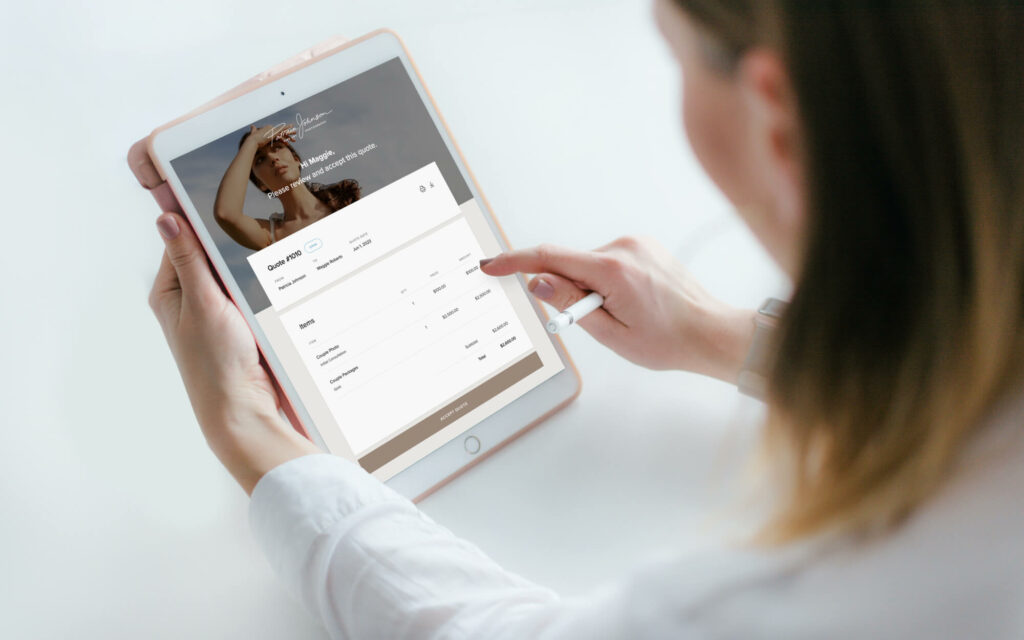
- Quotes - present your offerings and pricing to prospective clients, and invite them to select the services and options they are interested in. Once a price quote is accepted, an invoice draft is automatically generated for that client and that you can review and send.
- Studio Manager mobile app - run your photography business on the go with the Studio Manager mobile app. Manage bookings and documents, track projects, and collect payments right on your phone with the Tap to Pay feature. The Studio Manager mobile app is available for free via the Apple Store and Google Play.
- Mini sessions creator - create your mini sessions schedule in just a few clicks, so clients can start booking you right away. Just pick a date, add the session duration, the number of minis you want to offer, and add break time. That’s all! Your online schedule is created automatically and you're ready to share it with potential clients.
- Branded documents - personalize each document, whether it's a contract, invoice, questionnaire, or quote, with your branding. Add your logo and brand colors, then upload a header image that will be displayed on each document, for a more elegant feel.
- Project management - use a project board to organize all your client work based on workflow stages (e.g. Inquiry stage, Booked, Post-session, Completed). Track progress and enjoy having all the details, documents, galleries, and emails relevant to a client, neatly sorted and easy to find.
- Emails - send and receive emails directly from your Studio Manager dashboard, get instant notifications when clients respond, create email templates to optimize your process, and enjoy a centralized and streamlined workflow. In Inbox, you can view also email history for galleries delivered, contracts and invoices sent, and more.
- Contact forms - create custom forms and embed them into your website to automatically capture leads. When someone fills out the form, they will be added to your contacts list inside Studio Manager. You can also share your contact forms as a direct link, add them to your social media bio, email signature, etc.
- Templates for documents and emails - inside Studio Manager you'll find free samples for photography contracts and questionnaires that you can use right away. You can also create your own templates for contracts, invoices, questionnaires, quotes, and even email, and easily reuse them in the future.
- Automatic reminders - have clients get automatic follow up emails when their session is approaching, when they haven't signed their contract, paid the invoice, accepted your quote, or filled out a questionnaire. No more chasing clients for payments, Studio Manager does the work for you automatically.
- Scheduling documents - optimize your workflow by pre-scheduling when clients receive an invoice, contract, questionnaire, etc.
- Real-time notifications - get notified inside your dashboard and via your Studio Manager mobile app when a session is booked, a price quote is accepted, an invoice is paid, a contract is signed, a questionnaire is filled out, and more.

Pixieset Website
- Elegant ready-made website templates - the Pixieset website builder comes with a library of premade templates for all types of photographers and creative businesses. You can start with any template for free, or try out several to find what works best for your brand.
- Blog - built directly into Pixieset Website, the blog feature allows photographers to share client stories and useful information, recommend vendors and strengthen their SEO through articles. Once you switch from one template to another, you can easily migrate all your blog posts to your new site.
- Customization options - add your branding, choose between a variety of font options or upload your own custom ones, personalize the colors, tweak the page layouts, add new blocks or new pages, turn on site-wide animations, and more. Pixieset Website allows you to create a fully custom, and unique online presence.
- Booking calendar - add your online booking calendar from Studio Manager directly into any page on your website, so clients can review your availability and book a session right on your website.
- Website domain - by default your website will be hosted on a free Pixieset website domain which you can use indefinitely. You also have the possibility to connect your own custom domain to your site.
- Client Gallery integration - import photos directly from your galleries, as you create new pages or blog articles on your site. Also, you can create a Client Area on your site, where all your photo galleries are showcased and can be viewed by site visitors.
- Support for multiple media formats - use JPEGs, GIFs, PNGs, and embed videos on your pages to create a more engaging website.
- Flex Editor - all Pixieset website templates come with a drag-and-drop builder that offers you full control over your site's design. You can design new layouts or use premade blocks to create new pages for your site. Move images, text, videos, shapes, and buttons around. Resize and customize them to your liking. With Flex Editor, you can easily design unique layouts for your website and adjust them for desktop, tablet, and mobile view. It's fun, easy, and you don't need to know how to code to create a beautiful site.
- Personalized mobile view - easily preview how your website pages look on tablet and mobile devices, and make adjustments if needed, so your potential clients have an amazing experience regardless of the screen size on which they access your site.
- AI writing assistant - get help with writing texts for your website pages, refine the paragraphs that you've already written, or generate new ones from scratch.
- Privacy options - You can password-protect pages on your site, hide certain pages from your menu, or require a password for viewing your entire website.
- SEO options - your Pixieset website comes with a built-in SEO Manager which allows you to quickly review your website’s SEO Status, manage page titles, page descriptions, page redirects, broken links, etc. You can also auto-generate alt text for all the images on your website with a single click. Pixieset Website automatically generates your sitemap XML file and makes it available for search engines to crawl helping your site get indexed online.
- AI-powered image alt text - generate alt text for the images on your website. You can generate alt text for individual images, or toggle on the option to have alt text automatically added to all the images on your website (existing and future uploads).
- Page redirects - easily redirect traffic from an old page to a new one, inside your Pixieset Website dashboard.
- Landing pages - add dedicated pages to your website, designed to help you promote services, special deals, workshops, courses, and convert site visitors into paying clients. Your website comes with several ready-made landing page templates for various marketing purposes.
- SSL certificate - all Pixieset websites are secure and come with HTTPS (SSL) enabled by default.
- Analytics & tracking - connect your Google Analytics account to your website, and add a Facebook Pixel for better targeted ad campaigns.
- Bio links - create a beautiful, on-brand page that presents all your important links and can help your followers and subscribers connect with you and inquire you.
- Anchor links - make navigation on your site easier by letting your visitors jump right to the section that they're most interested in.
- Share site designs with others - if you're working with a designer, or a friend on a new site layout, you can easily share a block, or a full page via a link with them. The link allows them to preview your design, and also add it to their own Pixieset website.
- Cookie banner - display a cookie banner on your site to notify visitors of your use of cookies.
- Custom code - you can embed widgets and third party content into your Pixieset website through the Custom Embed Code block. You can also add code snippets into your header and footer if you want them applied across your entire website.

Pixieset Store
- Integrated into galleries - Pixieset Store is built into your client galleries, so clients can order prints and purchase digital images directly from their gallery.
- Elegant storefront - each of your galleries has a dedicated storefront designed to showcase and sell your photos and print products. See examples.
- Premium quality print products - you can offer prints, multiple types of framed photos, wall art, albums and photo books, greeting cards, bamboo panels, and more.
- Sell digital photos - with Pixieset you can sell your photos as digital downloads right inside the gallery and allow clients to purchase additional photos on top of their package.
- Personalized product previews - allow clients to preview how their photos will look on various printed products, so they can better visualize the end result and are more motivated to place an order.
- Product packages - create custom bundles inside your online store with popular products, or items that are most likely to be purchased, to motivate larger orders from clients.
- Gift cards - offer clients and their loved ones gift cards with a certain $ credit amount, that they can use at checkout when purchasing digital images and prints from their gallery.
- Coupons - create discount coupons for your clients that they can use when purchasing prints or digital photos from their gallery. You can set you coupon to be a % discount, a $ amount off, or free shipping.
- Marketing banners - increase visibility for your discount or special offer by adding a banner at the top of each client gallery, displaying the code, deadline, or any other special offer.
- Automatic Fulfillment of orders - when your clients purchase prints, their order is automatically sent to one of our partnering labs that will print, package and ship the order directly to your client. If you have a preferred lab locally that you want to work with, you can choose to offer printed products that are manually fulfilled by you once the client places an order through their gallery.
- Online and offline payment methods - accept payments through Stripe (credit card, digital wallets), PayPal, offline payments, or a combination of these.
- Commission fees - all paid plan users have a 0% commission on any purchases and get to keep 100% of the profits. Those who are on a free Pixieset plan will have a 15% commission on purchases made through Store.
Pixieset Photo Editor
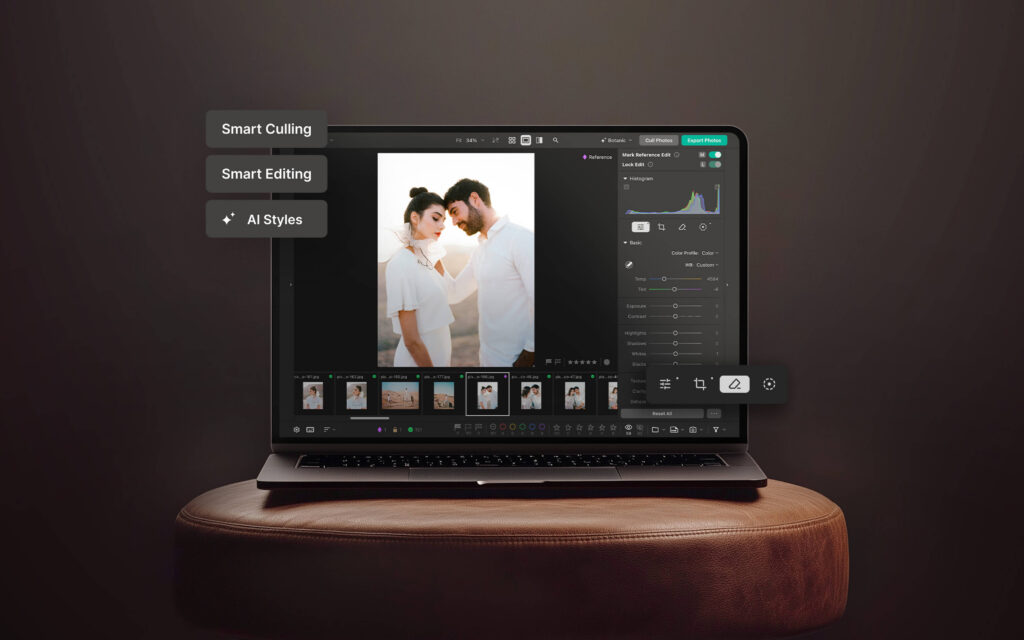
- RAW editing - Pixieset Photo Editor is designed to help you edit faster while keeping you in full creative control. Inside Photo Editor you’ll find a full professional editing panel with controls for lighting, coloring, HSL, curves, detail, vignette, and everything else.
- Smart editing - batch edit photos in your signature style with AI, for a fast and consistent look across all your photos.
- Predefined styles and personal styles - get started with predefined AI styles, or train your own custom style using past galleries and selected photos. Pixieset Photo Editor will analyze your selected work to learn your editing preferences and create a style you can save and reuse across future sessions.
- Presets - use the built-in presets in Photo Editor, or create your own to easily apply them to projects in the future.
- Smart culling - use AI-assisted culling to quickly sort through hundreds of photos, and instantly identify keepers and rejects. Photo Editor scores photos based on important details like blur, lighting, facial expressions, and closed eyes, to help you find your best shots quicker. You can also apply your own star ratings, color labels, and cull manually.
- Adaptive AI masking - the masking tools inside Photo Editor instantly selects subjects, backgrounds, and skies, to help you make edits and refinements. It also supports linear and radial masks.
- Smart straightening and cropping - Photo Editor automatically fixes alignment and perspective on the photos you upload into a project.
- Reference photo syncing - while manually editing a photo, you can set it as a reference and all the edits you’ve made will be automatically transferred across similar images to speed up your process.
- AI-powered erase, heal, and generative tools - remove distractions easily and refine imperfections on your photos in just a few clicks.
- RAW and JPEG support - Pixieset Photo Editor supports a wide range of RAW and JPEG formats, including ARW, CR2, CR3, CRW, DNG, HEIC, NEF, ORF, PEF, RAF, RAW, RW2, JPG, and JPEG. You can also export your images as TIFF or PSD files directly to your computer.
- Supported cameras - most major camera brands are supported, including Canon, Nikon, Sony, Fujifilm, Panasonic, and Olympus. To see the full list, start a new project and click View Supported Formats.
- Publish directly to a Pixieset gallery - no extra apps, no complicated setup. When your photos are ready, publish them directly to a Pixieset gallery using your preferred collection preset, then deliver them instantly or schedule delivery for the perfect time.
- Desktop and web app - Pixieset Photo Editor is available as both, a browser application, and a desktop application to match your preferred workflow.
- Privacy of your work - your photos, creative process, and editing style are private to you. Your photos and editing styles are never used to train large generative AI models.
- Local AI on your device - key AI features like AI Batch Editing and AI-assisted Culling run entirely on your own device, eliminating the need to upload photos to cloud servers for processing.
Still reading?
You know what they say - better try it once than read a long article about it. Sign up for a free account and start exploring all the amazing features offered by Pixieset for your photography business.

 Client Gallery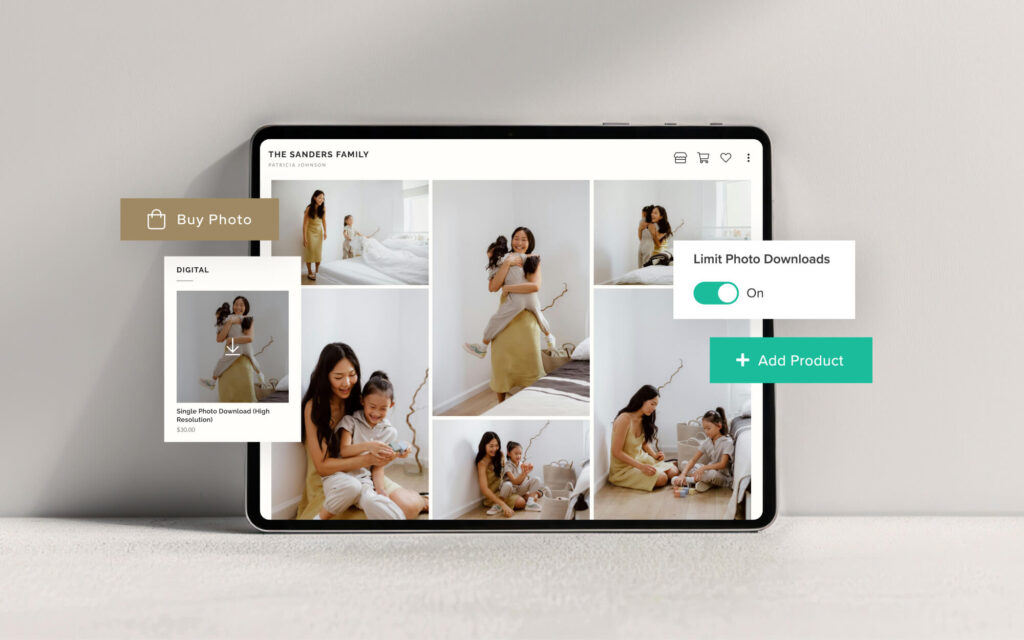
 Store
Store 

 Studio Manager